Dehydrator Temperature for Beef Jerky
USDA advises heating beef to 160°F before drying, then holding the dehydrator at 130 to 140°F while the jerky dries. Use a food thermometer on the meat, because the machine's air setting does not show the meat's temperature.
On this page (8 sections)
- What temperature does beef jerky need in a dehydrator?
- Why does USDA ask for a pre-heat step?
- Which dehydrator settings hold 130 to 140°F for beef jerky?
- Which thermometer should you use on the meat?
- Do venison and other game meat use the same temperatures?
- Do an oven or a smoker use the same beef jerky temps?
- Beef jerky temp mistakes with a dehydrator
- Your beef jerky temp checklist for a dehydrator
Heat the beef to 160°F first, then hold the dehydrator at 130 to 140°F while the strips dry. Those are USDA's two numbers for jerky, and a food thermometer is the only way to confirm the first one.
This guide explains each number, then the controls and thermometers that make them easy to hit. For the full routine, read how to make jerky in a dehydrator, and for machine basics see food dehydrators for jerky.
What temperature does beef jerky need in a dehydrator?
Beef jerky needs two temperatures: 160°F for the meat before drying, and 130 to 140°F while it dries. Both come from USDA's jerky guidance, which is the source to follow.
Beef jerky temp in a dehydrator: the pre-heat
USDA advises heating beef to 160°F before the drying step. Check it with a food thermometer instead of guessing from color or time.
Poultry jerky has a higher target of 165°F. The USDA jerky and food safety page gives the full steps.
The 130 to 140°F drying range
Once the meat has reached 160°F, hold the dehydrator at 130 to 140°F while the strips dry. That range is the drying stage in USDA's guidance, and it sits well below the top setting on most machines.
How a food dehydrator works explains how the heater, fan and thermostat hold a steady air temperature.
Why does USDA ask for a pre-heat step?
USDA says many dehydrator manuals leave out the pre-heat step, and that a dehydrator on its own may not reach a temperature that kills bacteria. So the pre-heat stays on your checklist, no matter how high the machine goes.
The display shows air, not meat
The display reads the air inside the machine, not the meat. A steady air setting doesn't confirm the meat has reached 160°F, so check it with a probe.
Read the manual, then the guidance
A manual that skips the pre-heat is a reason to read USDA's jerky guidance, not a reason to skip the step. Use the manual for your machine's own settings and USDA's steps for the meat.
Check the meat before it goes on the trays
Heat the seasoned meat, then check the thickest piece with a probe before any strip goes on a tray. Keep checking until it reads 160°F.
Which dehydrator settings hold 130 to 140°F for beef jerky?
Look for a control that can hold a low setting in the 130 to 140°F range, in steps small enough to set the number you want. The low end of the range matters as much as the top.
A 1-degree control with a jerky preset
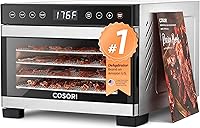
The Cosori 5-tray runs from 95 to 176°F in 1-degree steps, and it has four presets: jerky, fruit, vegetables and yogurt. Its timer runs from 30 minutes to 48 hours in 30-minute steps.
It has 3.1 square feet of drying space across five trays, so it suits smaller batches better than the six-tray models. It measures 13.9 by 11.3 by 8.9 inches (depth, width and height), so check your counter first.
Treat a preset as a starting point
A jerky preset is a starting point, not a replacement for the numbers. Check the temperature it sets against USDA's 130 to 140°F drying range, and use the 1-degree control to adjust it if it falls outside.
More trays with the same fine control
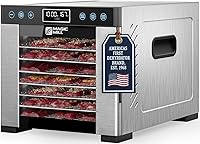
The Magic Mill Pro 7-tray also moves in 1-degree steps from 95 to 176°F, and it has seven full-size stainless steel trays for bigger batches.
Timing is a separate question, covered in how long does it take to make jerky in a dehydrator. For a shortlist of machines, best dehydrators for jerky compares them.
Which thermometer should you use on the meat?
Any food thermometer that reads the meat's temperature will do, and a fast probe makes the 160°F check easier. The dehydrator's display reads the air, so the probe is your only check on the meat.
A probe with a long stainless steel stem
The TempPro TP19H has a 4.3-inch stainless steel probe and a 2.0-inch backlit display. TempPro says it has ±0.9°F accuracy and is NSF certified.
A one-second reader
ThermoWorks says the Thermapen ONE reads in one second, is accurate to ±0.5°F and is NSF certified. It has no hold button, so the display shows live readings as you check.
Do venison and other game meat use the same temperatures?
Yes, USDA's jerky guidance applies to jerky made from meat, venison included. The same 160°F pre-heat and 130 to 140°F drying range apply to deer jerky.
Check the thickest strip with the probe, since game strips vary in thickness just as beef strips do. The deer jerky in a dehydrator guide covers the kitchen steps.
Do an oven or a smoker use the same beef jerky temps?
For an oven, yes: USDA says home ovens and dehydrators both need the pre-heat step, so the 160°F check applies to either one. For a smoker, follow the same USDA guidance and the smoker's manual.
A dehydrator is a countertop machine for steady low heat, while a smoker is a bigger outdoor machine that adds flavor. Neither tool is safer by default.
Dehydrator vs oven for beef jerky compares the oven route, and dehydrator vs smoker for beef jerky covers the smoker.
Beef jerky temp mistakes with a dehydrator
Most temperature mistakes come from treating the air setting as the meat's temperature.
Reaching for the top setting
A higher setting doesn't replace the pre-heat, and it doesn't change the drying range USDA describes. Keep both numbers on your checklist.
Skipping the probe
Relying on the display alone leaves the meat unchecked. Put the probe in the thickest piece and read it before the strips go on the trays.
Trusting a preset without checking it
A preset's temperature may not match USDA's 130 to 140°F drying range. Check the number on the display before you walk away.
Your beef jerky temp checklist for a dehydrator
Pre-heat the meat to 160°F, then dry it at 130 to 140°F, checking the meat with a thermometer at each stage. Read your machine's manual and confirm its temperature steps before you start.
- Slice and season the meat.
- Heat it to 160°F (165°F for poultry) and confirm with the probe.
- Load the strips with space between them.
- Set the dehydrator to a number from 130 to 140°F.
- Check a few cooled strips when the timer ends.
Write down the setting and the probe reading for each batch. Those notes show whether your machine holds its range and make the next batch easier to set up.
The how to make jerky in a dehydrator guide puts these temperatures into a full routine. Browse the jerky dehydrator guides to compare machines.
Frequently asked questions
What temperature should a dehydrator be for beef jerky?
USDA advises heating beef to 160°F before drying, then holding the dehydrator at 130 to 140°F while the jerky dries. Check the meat with a food thermometer, because the machine's air setting does not show the meat's temperature, and read your manual for the exact steps.
Why does jerky need a pre-heat step?
USDA says many dehydrator manuals leave out the pre-heat step, and that a dehydrator on its own may not reach a temperature that kills bacteria. That is why the 160°F pre-heat stays on your checklist, whatever the machine's highest setting is.
Can you use the same temperature for venison jerky?
USDA's jerky guidance applies to jerky made from meat, venison included, so follow the same steps for deer jerky. Check your machine's manual for its own settings, and keep a food thermometer on hand to check the thickest strip before drying.
Does an oven need the same pre-heat as a dehydrator?
USDA says home ovens and dehydrators both need the pre-heat step, so the 160°F check applies to either one. A thermometer reading shows the meat's temperature either way, and each machine's manual covers its own settings, so read it before your first batch.